|
Descriptions
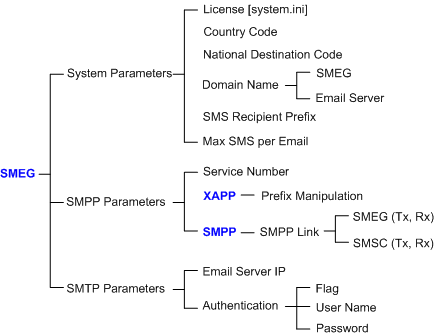
UltraWAVE Short Message-Email Gateway (SMEG) lies in between the SMSC and the email server. It acts as a short message/email transit center, which provides message format conversions between SMS and SMTP. The SMEG receives and sends messages from/to SMS via the SMPP connection and email messages from/to the host email server via the integrated SMTP server.
The SMEG configuration structure is displayed as the figure quoted below.
Implementation
1.Go to EMS >Configuration >NSS >SMEG.
2.Click the  button at the upper right corner. button at the upper right corner.

1.Refer to the SMEG parameters dictionary to configure the relevant parameters.
2.Click the  button to update parameters to application servers. button to update parameters to application servers.
|
1.Go to EMS >Configuration >NSS >XAPP.
2.Click the button at the upper right corner.

1.Click the Prefix Manipulation tab, and then click New at the bottom of the Prefix Manipulation table.
2.In the Prefix ID box, select an available number for the new Prefix, and then click the  button. button.
3.In the Prefix Manipulation Option window, configure the relevant parameters given in the following table.
4.Click the button to update Prefix Manipulation parameters to application servers.
Sub-parameter
|
Description
|
Recommended Value
|
Prefix
|
SMPP service number preset in the SMEG parameter (SMPP Link Alias).
|
96666
|
Deletion Count
|
The amount of digits to be deleted from the beginning of the service number.
|
0
|
Insertion Count
|
The amount of digits to be inserted to the front of the service number.
|
0
|
Inserted Digits
|
The digits to be added to the front of the service number.
|
N/A
|
Number Length
|
The length of the incoming service number.
•0 = Length is uncertain |
0
|
|
1.Go to EMS >Configuration >NSS >SMPP.
2.Make sure the System ID at the upper right corner displays SMPP(MSS_Pub), click the button.

1.Click the SMPP Link tab, and then click New at the bottom of the SMPP Link table.
2.In the SMPP Link ID box, select an available number for link, and then click the button.
3.In the SMPP Link Option window, configure the relevant parameters given in the following table to add Link#3.
4.Click the button to update Prefix Manipulation parameters to application servers.
5.Repeat Step 2 to 4 to add Link#4, Link#7 and Link#8.
|
SMPP(EMS_0)
|
SMPP(MSS_Pub)
|
SMPP(EMS_1)
|
SMPP(MSS_Pub)
|
Sub-parameter
|
Link#1
|
Link#2
|
Link#3
|
Link#4
|
Link#5
|
Link#6
|
Link#7
|
Link#8
|
Link Flag
|
Enable
|
Enable
|
Enable
|
Enable
|
Enable
|
Enable
|
Enable
|
Enable
|
Assigned Flag
|
Assigned
|
Assigned
|
Assigned
|
Assigned
|
Assigned
|
Assigned
|
Assigned
|
Assigned
|
Link Type
|
TCP
|
TCP
|
TCP
|
TCP
|
TCP
|
TCP
|
TCP
|
TCP
|
Server Type
|
Client
|
Client
|
Server
|
Server
|
Client
|
Client
|
Server
|
Server
|
Session Type
|
BIND_Tx
|
BIND_Rx
|
BIND_Tx
|
BIND_Rx
|
BIND_Tx
|
BIND_Rx
|
BIND_Tx
|
BIND_Rx
|
System ID
|
SMEG
|
SMEG
|
SMEG
|
SMEG
|
SMEG
|
SMEG
|
SMEG
|
SMEG
|
Password
|
123456
|
123456
|
123456
|
123456
|
123456
|
123456
|
123456
|
123456
|
System Type
|
GSM
|
GSM
|
GSM
|
GSM
|
GSM
|
GSM
|
GSM
|
GSM
|
Local GTT
|
--
|
--
|
--
|
--
|
--
|
--
|
--
|
--
|
Remote GTT
|
--
|
--
|
--
|
--
|
--
|
--
|
--
|
--
|
Local IP
|
SMEG0 IP
|
SMEG0 IP
|
SMSC0 IP
|
SMSC0 IP
|
SMEG1 IP
|
SMEG1 IP
|
SMSC1 IP
|
SMSC1 IP
|
Remote IP
|
SMSC0 IP
|
SMSC0 IP
|
SMEG0 IP
|
SMEG0 IP
|
SMSC1 IP
|
SMSC1 IP
|
SMEG1 IP
|
SMEG1 IP
|
Session Init Timer
|
5
|
5
|
5
|
5
|
5
|
5
|
5
|
5
|
Enquiry Link Timer
|
10
|
10
|
10
|
10
|
10
|
10
|
10
|
10
|
Inactivity Timer
|
5
|
5
|
5
|
5
|
5
|
5
|
5
|
5
|
Response Timer
|
10
|
10
|
10
|
10
|
10
|
10
|
10
|
10
|
Service Number
|
96666
|
96666
|
96666
|
96666
|
96666
|
96666
|
96666
|
96666
|
|
1.Go to EMS >Configuration >NSS >SMPP.
2.Make sure the System ID at the upper right corner displays SMPP(EMS_0), click the button.

1.Click the SMPP Link tab, and then click New at the bottom of the SMPP Link table.
2.In the SMPP Link ID box, select an available number for link, and then click the button.
3.In the SMPP Link Option window, configure the relevant parameters given in the following table to add Link#1.
4.Click the button to update Prefix Manipulation parameters to application servers.
5.Repeat Step 2 to 4 to add Link#2.
|
SMPP(EMS_0)
|
SMPP(MSS_Pub)
|
SMPP(EMS_1)
|
SMPP(MSS_Pub)
|
Sub-parameter
|
Link#1
|
Link#2
|
Link#3
|
Link#4
|
Link#5
|
Link#6
|
Link#7
|
Link#8
|
Link Flag
|
Enable
|
Enable
|
Enable
|
Enable
|
Enable
|
Enable
|
Enable
|
Enable
|
Assigned Flag
|
Assigned
|
Assigned
|
Assigned
|
Assigned
|
Assigned
|
Assigned
|
Assigned
|
Assigned
|
Link Type
|
TCP
|
TCP
|
TCP
|
TCP
|
TCP
|
TCP
|
TCP
|
TCP
|
Server Type
|
Client
|
Client
|
Server
|
Server
|
Client
|
Client
|
Server
|
Server
|
Session Type
|
BIND_Tx
|
BIND_Rx
|
BIND_Tx
|
BIND_Rx
|
BIND_Tx
|
BIND_Rx
|
BIND_Tx
|
BIND_Rx
|
System ID
|
SMEG
|
SMEG
|
SMEG
|
SMEG
|
SMEG
|
SMEG
|
SMEG
|
SMEG
|
Password
|
123456
|
123456
|
123456
|
123456
|
123456
|
123456
|
123456
|
123456
|
System Type
|
GSM
|
GSM
|
GSM
|
GSM
|
GSM
|
GSM
|
GSM
|
GSM
|
Local GTT
|
--
|
--
|
--
|
--
|
--
|
--
|
--
|
--
|
Remote GTT
|
--
|
--
|
--
|
--
|
--
|
--
|
--
|
--
|
Local IP
|
SMEG0 IP
|
SMEG0 IP
|
SMSC0 IP
|
SMSC0 IP
|
SMEG1 IP
|
SMEG1 IP
|
SMSC1 IP
|
SMSC1 IP
|
Remote IP
|
SMSC0 IP
|
SMSC0 IP
|
SMEG0 IP
|
SMEG0 IP
|
SMSC1 IP
|
SMSC1 IP
|
SMEG1 IP
|
SMEG1 IP
|
Session Init Timer
|
5
|
5
|
5
|
5
|
5
|
5
|
5
|
5
|
Enquiry Link Timer
|
10
|
10
|
10
|
10
|
10
|
10
|
10
|
10
|
Inactivity Timer
|
5
|
5
|
5
|
5
|
5
|
5
|
5
|
5
|
Response Timer
|
10
|
10
|
10
|
10
|
10
|
10
|
10
|
10
|
Service Number
|
96666
|
96666
|
96666
|
96666
|
96666
|
96666
|
96666
|
96666
|
|
1.Go to EMS >Configuration >NSS >SMPP.
2.Make sure the System ID at the upper right corner displays SMPP(EMS_1), click the button.

1.Click the SMPP Link tab, and then click New at the bottom of the SMPP Link table.
2.In the SMPP Link ID box, select an available number for link, and then click the button.
3.In the SMPP Link Option window, configure the relevant parameters given in the following table to add Link#5.
4.Click the button to update Prefix Manipulation parameters to application servers.
5.Repeat Step 2 to 4 to add Link#6.
|
SMPP(EMS_0)
|
SMPP(MSS_Pub)
|
SMPP(EMS_1)
|
SMPP(MSS_Pub)
|
Sub-parameter
|
Link#1
|
Link#2
|
Link#3
|
Link#4
|
Link#5
|
Link#6
|
Link#7
|
Link#8
|
Link Flag
|
Enable
|
Enable
|
Enable
|
Enable
|
Enable
|
Enable
|
Enable
|
Enable
|
Assigned Flag
|
Assigned
|
Assigned
|
Assigned
|
Assigned
|
Assigned
|
Assigned
|
Assigned
|
Assigned
|
Link Type
|
TCP
|
TCP
|
TCP
|
TCP
|
TCP
|
TCP
|
TCP
|
TCP
|
Server Type
|
Client
|
Client
|
Server
|
Server
|
Client
|
Client
|
Server
|
Server
|
Session Type
|
BIND_Tx
|
BIND_Rx
|
BIND_Tx
|
BIND_Rx
|
BIND_Tx
|
BIND_Rx
|
BIND_Tx
|
BIND_Rx
|
System ID
|
SMEG
|
SMEG
|
SMEG
|
SMEG
|
SMEG
|
SMEG
|
SMEG
|
SMEG
|
Password
|
123456
|
123456
|
123456
|
123456
|
123456
|
123456
|
123456
|
123456
|
System Type
|
GSM
|
GSM
|
GSM
|
GSM
|
GSM
|
GSM
|
GSM
|
GSM
|
Local GTT
|
--
|
--
|
--
|
--
|
--
|
--
|
--
|
--
|
Remote GTT
|
--
|
--
|
--
|
--
|
--
|
--
|
--
|
--
|
Local IP
|
SMEG0 IP
|
SMEG0 IP
|
SMSC0 IP
|
SMSC0 IP
|
SMEG1 IP
|
SMEG1 IP
|
SMSC1 IP
|
SMSC1 IP
|
Remote IP
|
SMSC0 IP
|
SMSC0 IP
|
SMEG0 IP
|
SMEG0 IP
|
SMSC1 IP
|
SMSC1 IP
|
SMEG1 IP
|
SMEG1 IP
|
Session Init Timer
|
5
|
5
|
5
|
5
|
5
|
5
|
5
|
5
|
Enquiry Link Timer
|
10
|
10
|
10
|
10
|
10
|
10
|
10
|
10
|
Inactivity Timer
|
5
|
5
|
5
|
5
|
5
|
5
|
5
|
5
|
Response Timer
|
10
|
10
|
10
|
10
|
10
|
10
|
10
|
10
|
Service Number
|
96666
|
96666
|
96666
|
96666
|
96666
|
96666
|
96666
|
96666
|
|
Return to
•Tasks List
•Elements List
2.56
|
