Descriptions
GSM subscriber numbers continue to grow around the world. Most of the new GSM subscribers are coming from low income populations of the under-developed countries and a lot of them are living in rural/remote areas without infrastructure and radio coverage. The most popular ways to connect the rural/remote areas to the core telecommunication network in the under-developed countries are microwave and satellite links. In quite a lot of areas, satellite is the only available solution. But the backhaul satellite link is expensive and the transmission bandwidth is a bottleneck. For operators, the transmission cost of the backhaul is a significant factor of the total operation expenses. The cost of the transmission is one of the largest barriers in bringing the mobile services to the under-developed countries.
Intelligent RTP Local Switching (iRLS) function is a solution for helping the operators achieves significant saving in the transmission bandwidth between the core network and the rural/remote areas to overcome the barrier.
In standard GSM architecture, calls are routing to the MSC even if the calling and the called parties are in the same BSC zone. iRLS function enable the GSM system to route calls locally whenever the calling and called parties are in the same BSS zone; hence saving the backhaul transmission bandwidth. iRLS only controls the routing of the call traffic, the call signaling is still under the control of the host MSC. iRLS is integrated in UltraWAVE MSS and works with iPALIM function.
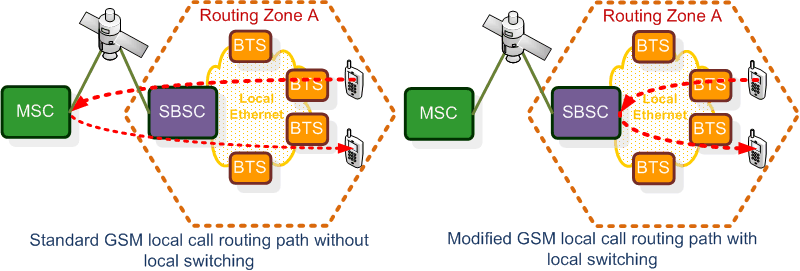
Implementation

Refer to Configuring iPALIM to complete the iPALIM configuration.
|

Refer to Enabling Local Call and Routing by Location to complete the MSC Routing Zone configuration.
|

1.FTP VIM software (rtp_proxyInstall_Rx.x.xx.tgz) to VIM server as www account.
//The default FTP directory is /home/www//
2.Telnet to the VIM server and switch to the super user:
login: www
Password:
[www@vim-1 www]$ su -
Password:
3.[root@vim-1 root]# mv /home/www/rtp_proxyInstall_Rx.x.xx.tgz /usr/local/src
4.[root@vim-1 root]# cd /usr/local/src
5.[root@vim-1 src]# tar xvfz rtp_proxyInstall_Rx.x.xx.tgz
6.[root@vim-1 src]# ./rtp_proxyInstall/install
//Run script to install VIM software as prompt//
7.[root@vim-1 src]# cd /usr/local/rtp_proxy/conf/
//The rtpproxy.conf is stored under this path//
8.[root@vim-1 conf]# vi rtpproxy.conf
RTPPROXYID=1234
//Specify the index number in the VIM domain name. e.g. the full VIM domain name is "VIM-1234".//
RTPPROXYIP=192.168.0.1
//Specify the IP address of the VIM server.//
RTPPROXYPEERIP=0.0.0.0
//It is an optional parameter for IP restriction, fill the IP of related MSS.//
//Reserved as 0.0.0.0 if no IP restriction required.//
SERIALNUM=00000250
//It is the SN displayed on EMS GUI.//
9.Save file and exit editor by type:
:wq
10.Start the VIM process by the following command:
[root@vim-1 conf]# rtpproxyd start
|
1.Go to EMS >Configuration >NSS >iRLS.
2.Click the
1.On the System tab, configure the relevant parameters given in the following table.
2.Click the
1.Click the VIM MG tab, and then click New at the bottom of the VIM MG table.
2.In the VIM MG ID box, select an available number for the new MG, and then click the
3.In the VIM MG Option window, configure the relevant parameters given in the following table.
4.Click the
1.Click the Routing Zone tab.
2.In the Routing Zone List window, configure the relevant parameters given in the following table.
3.Click the
|


 button to update parameters to application servers.


See Also
Return to
2.69