Descriptions
This feature allows operators to design flexible incentive service plans to attract customers of different market sectors. UltraWAVE PPS Cap Call function sets the tariff rates according to the accumulative usage, in terms of traffic time or call charge, of a subscriber.
The Prepaid Cap Call function allows the operator to design prepaid tariff profiles with different tariff rates in different segments. The tariff profile may composite of up to four segments. Each segment may use different tariff plans. The boundaries of a segment may be defined by accumulated amount of traffic time or accumulated call charge balance of the subscriber in a monthly period. The Start and End day of the monthly period is set by the operator.
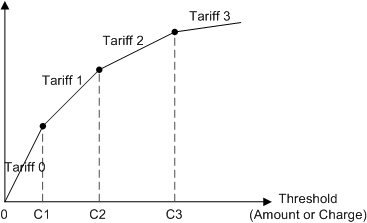
In above figure, C1, C2, C3 are called caps (or threshold). This plan supports up to 3 caps, 4 different zones. The tariff can be different for each cap zone, and it also can be set to 0.
Cap Call function consists two parts - the Voice cap call and the SMS cap call. SMS cap call will be implemented in phase one and Voice cap call will be developed in phase two.
There are two types of Cap Call measurements adopted in the market: measure by accumulated service volume or service (charge) amount. UltraWAVE Prepaid Cap Call supports both. Voice call and SM call have their own Cap Call accumulators.
•Service volume: Accumulated Call duration or accumulated number of SM.
•Service amount: Accumulated Call charge or accumulated SM charge.
Cap calls can be further subdivided into two types by their destinations: within home PLMN and outside home PLMN. Operators may differentiate the cap calls made within the home PLMN or to other PLMN. They may set different cap values to calls within the home PLMN calls from calls to other PLMN. This feature gives the operators more flexibilities in designing their service plan.
•Cap calls to home PLMN
•Cap calls to other PLMN
Implementation

Operator designs the prepaid tariff profiles with different tariff rates in different segments. The tariff profile may composite of up to four segments. Each segment may use different tariff plans. The boundaries of a segment may be defined by accumulated amount of traffic time or accumulated call charges of the subscriber of the monthly period.
|
1.Click to open the Service Control >COS tab.
2.Click the hyperlinked index number to open an existing COS table, or click New to create a new COS table.
3.In the Call CAP Plan table, configure the necessary parameters given in the following table.
4.Click the
|

 button to update parameters to application servers.
1.Click on the Advanced main menu.
2.Select MO under the Tariff Plan submenu, this displays the MO tariff configuration window.
3.Select the Tariff ID at the upper-right corner.
4.Add the prefix for cap voice call in MO Basic Tariff table.
5.Set Cap Flag to specify the call destination (home PLMN or other PLMN).
6.Add the prefix for cap SM in SMS Tariff table.
7.Set Cap Flag to specify the call destination (home PLMN or other PLMN).
8.Complete all Cap Call prefixes and set configuration to PPS servers.
9.Repeat the procedures to configure other Tariff IDs.
|

1.Select Startup under the Tariff Plan submenu, this display the Tariff Startup window.
2.On the operation page, set the start time for the new tariff plan, and enter the description for the tariff plan in the Remarks field.
3.Click the
4.The Cap tariff will be activated at the preset startup time.
|

 button to set the start time.
Operator assigns the proper COS ID to PPS subscriber profile when the customer applies the prepaid Cap Call service. Customer can get more value than he actually pays for after the new tariff plan is activated.
|
Return to
2.48.4