Descriptions
Premium Call is a call during which certain services are provided, and for which prices higher or lower than normal are charged. Unlike a normal call, part of the call charge is paid to the service provider, thus enabling businesses to be funded via the calls. While the tariff is different, calls are usually routed the same way they are for a toll-free telephone number, being anywhere despite the area code used.
The issuing of the premium call numbers to service providers is typically regulated by a national body to ensure certain community standards are adhered to both in terms of content and price. Charges are presented as part of the normal telephone bill.
Chat lines and tech support are a very common use of premium-rate numbers. Other services include directory inquiries, weather forecasts, competitions and voting (especially relating to television shows). Diplomatic services, such as the US embassy in London or the UK Embassy in Washington, have also been seen to charge premium rates for calls from the general public.
Implementation
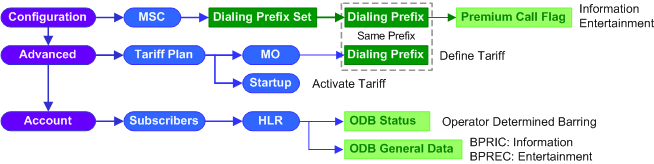

1.Go to EMS >Configuration >NSS >MSC.
2.Click the
1.Click the Dialing Prefix Set tab to display the Dialing Prefix Set table.
2.Click the proper hyperlinked index of an existing Dialing Prefix Set to open its Option window.
3.Click the hyperlinked number in the Dialing Prefix Entries field to open the Prefix table.
4.Click New at the bottom of the Prefix table to add premium prefix.
5.In the Prefix ID box, click the
6.In the Prefix Option window, configure the relevant parameters given in the following table.
7.Click the
8.Click the
9.Repeat Step 4 to 8 to add more premium prefixes.
1.Go to EMS >Account >Subscriber >HLR.
2.Click the hyperlinked IMSI of the subscriber to open its Option window.
3.Configure the relevant parameters given in the following table.
4.Click the
Refer to the hyperlinked section to Create and Activate Tariff for premium call prefixes.
|
||||||||||||||||||||||||||||||||||||||||||||||||||||||||||||



 button to update Prefix parameters to application servers.
 button to activate the new created premium prefix.

See Also
Return to
2.43