A typical UltraWAVE EMS GUI screen is divided into 5 windows as below:
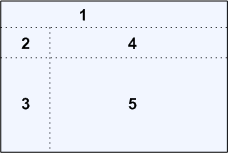
No. |
Windows Name |
Components |
1 |
Main Menu |
Company Logo, Main Menu, Alarm Indicators |
2 |
System Info |
System Time, Network Name, System Serial Number, Current Login Account |
3 |
Submenu |
Navigation Tree, Online Help Hyperlink, Site Map Hyperlink, Exit Button |
4 |
Operation Bar |
Operation Buttons, Online Help Hyperlink |
5 |
Operation Window |
Operation Window |
The main menu lies on the top of the screen. The following table shows the function categories of the main menu.
Function Button |
Features |
Status |
Status details for entities Alarms |
Performance |
Service and call statistics Graphical statistics reports |
Log |
Call Detailed Record (CDR) CDR and CSTA backup Used recharge cards record Operation event and alarm logs |
Configuration |
Configure NSS and BSS parameters |
Account |
Subscriber query, modification and import |
Maintenance |
Parameter files backup Account files backup Event and alarms logs backup System public parameters configuration |
Advanced |
Configure system parameters For high privilege to maintain system |
Each function of the main menu contains a submenu which is displaying in a vertical navigation tree in the left-hand column of the screen. The system time and current login account displays at the top of the screen.
Choose a category:


The operation windows provide user operational data and results.
The alarm status indicator displays the following information:
•Five alarm status areas, one area for each alarm severity. The alarm severities are color coded, for example, the color red indicates a critical alarm, orange indicates a major alarm etc.
•Move the cursor on the flashing alarm indicator to display the number of alarms.
•Click on the flashing alarm indicator to display the alarm descriptions.
The following table lists the alarm severities and their corresponding color-codes:

Color Code |
Alarm Severity |
Descriptions |
|
Critical |
Severely broken and no workaround. |
|
Major |
A defect that needs to be fixed but there is a workaround. |
|
Minor |
A defect that causes small impact. Easy to recover or workaround. |
|
Warning |
Trivial defect. |
|
Indeterminate |
Undefined problems. |
0.1