Descriptions
The Called Number Prefix Barring feature allows an operator or service provider to bar subscriber within his home PLMN from making an outgoing call with certain destination prefix. There can be multiple destination prefixes to be barred and they are configurable. There are two different profiles allowed to be set. Each profile contains a different set of number prefixes subject to barring. Operator can then assign different profiles to different subscribers according to the services they have subscribed.
This feature provides operators a truly flexible call barring tool for a variety of destinations to be restricted. Since the restriction is dialing prefix based, this feature gives the operator full flexibility to bar some subscribers from calling any call destinations. no matter it is local or domestic or international. This is in addition to the already implemented standard international call barring and the Operator Determined Call Barring features. The operators may want to enable the barring for those who have difficulty paying the bills while putting not barring for their premium subscribers.
There are two OSB attributes, OSB-1 & OSB-2 flags, defined in each Dialing Prefix’s propriety. If a Dialing prefix’s OSB flag is enabled then this Dialing Prefix is subject to that OSB call restriction. The operator constructs the two OSB profiles by setting the OSB flags of the Dialing Prefixes. The operator could apply one or two OSB profile(s) to the subscribers. When a subscriber with OSB applied tries to make an outgoing call with the number which Dialing Prefix OSB is enabled, the call will be barred. This feature has no impact on the mobile terminated calls.
A voice notification will be produced when a call is barred. The voice announcement is to inform the subscriber why call is barred so that the subscriber is not mistaken in thinking that the system is not connecting a particular call.
Implementation
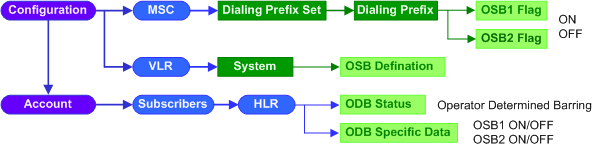

1.Go to EMS >Configuration >NSS >MSC.
2.Make sure the System ID at the upper right corner displays MSC_pub, click the
1.Click the Dialing Prefix Set tab to display the Dialing Prefix Set table.
2.Click the proper hyperlinked index of an existing Dialing Prefix Set to open its Option window.
3.Click the hyperlinked number in the Dialing Prefix Entries field to open the Prefix table.
4.Click New at the bottom of the Prefix table to add OSB prefix.
5.In the Prefix ID box, click the
6.In the Prefix Option window, configure the relevant parameters given in the following table.
7.Click the
8.Click the
9.Repeat Step 4 to 8 to add more OSB prefixes.
|
||||||||||||||||||||||||||||||||||||||||||||||||||



 button to update Prefix parameters to application servers.
 button to activate the new created premium prefix.
1.Go to EMS >Configuration >NSS >VLR.
2.Make sure the System ID at the upper right corner displays VLR_pub, click the
1.On the System tab, configure the relevant parameters given in the following table.
2.Click the
|

1.Go to EMS >Account >Subscriber >HLR.
2.Click the hyperlinked IMSI of the subscriber to open its Option window.
3.Click the
4.Configure the relevant parameters given in the following table.
5.Click the
|

 button at the top of the parameter table to update values from HLR servers.
See Also
Return to
2.46