Descriptions
The Authentication Center or AUC is a function to authenticate each SIM card that attempts to connect to the GSM network. Once the authentication is successful, the HLR is allowed to manage the SIM and services. If the authentication fails, then no services are possible from that particular combination of SIM card and mobile phone operator attempted. There is an additional form of identification check performed on the serial number of the mobile phone described in the EIR section below, but this is not relevant to the AUC processing.
In the authentication process, each MS sends a registration request and receives a unique challenge from the network. The MS calculates the response to its challenge and sends a message back to the network. The VLR, which contains a list of triplets (unique challenge, response to the challenge, and private key), compares the triplets with the response it received from the MS. If the response matches, the MS is registered with the network and the used triplet discarded. After all triplets are used, the VLR queries HLR for a new set. Each query typically results in three triplets. The UltraWAVE system can optionally give permission to reuse triplets to reduce the communications load.
To enable Authentication, SCCP and VLR parameters need to be configured on NSS side.
Implementation
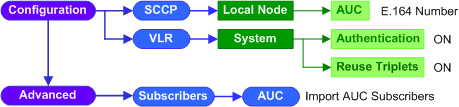

1.Go to EMS >Configuration >NSS >SCCP.
2.Make sure the System ID at the upper right corner displays SCCP(MSS_Pub), click the
1.Click the Local Node tab.
2.Click the hyperlinked index number of AUC to open the AUC Option window.
3.Configure the relevant parameters given in the following table.
4.Click the
|


 button to update parameters to application servers.
1.Go to EMS >Configuration >NSS >VLR.
2.Click the
1.On the System tab, click parameter value in Authentication field to open its Option window.
2.Configure the relevant parameters given in the following table, click the
3.Click the
|

1.Go to EMS >Configuration >NSS >VLR.
2.Click the
1.On the System tab, click parameter value in Reuse Triplets field to open its Option window.
2.Configure the relevant parameters given in the following table, click the
3.Click the
|
See Also
•Enable Equipment Identity Register
Return to
2.44