Descriptions
The tier rating feature allows each prepaid call to be charged in different tariffs, based on the call duration. The PPS supports up to three tiers for one call, each tier can set its own period, basic fee and long distance fee.
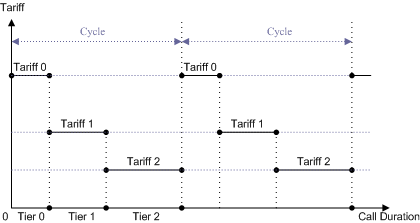
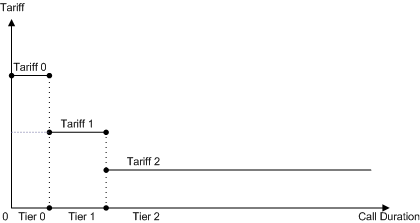
Depending on the setting of tier period, the operation can decide whether continue adopting the last tier tariff or repeat the tier cycle after reaching the deadline of the last configured tier:
•Cyclical Tier Rating: Set the Tier Units parameter to rational value to demarcate each of the tier periods.
•Noncyclical Tier Rating: Set the last Tier's Units parameter to an enormous value to extend the last tier period.
Implementation

Operator designs the prepaid tariff profiles with different tariff rates for different tiers in a call. The tariff profile may composite of up to three tiers in a cycle. Each tier may use different tariff. The boundary of a tier is defined by accumulated duration in a call.
|
1.Go to EMS >Advanced >Tariff Plan >Refresh.
2.Click the second Download button to update the current Tariff Plan from PPS to OMC GUI.
1.Click on the Advanced main menu.
2.Select MO under the Tariff Plan submenu, this displays the MO tariff configuration window.
3.Select the Tariff ID at the upper-right corner.
4.Click the hyperlink of an existing prefix, or click +Add button to add a new prefix.
5.Configure the relevant parameters given in the following table.
6.Click the
7.Repeat the procedures to configure other prefixes or Tariff IDs.
|


 button to update parameters to application servers.
1.Select Startup under the Tariff Plan submenu, this display the Tariff Startup window.
2.On the operation page, set the start time for the new tariff plan, and enter the description for the tariff plan in the Remarks field.
3.Click the
4.The Tier Rating tariff will be activated at the preset startup time.
|

 button to set the start time.
Return to
2.48.9